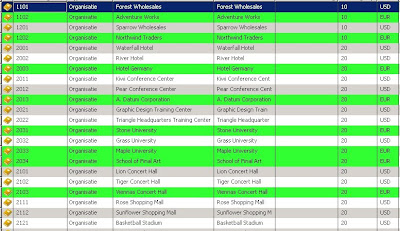
But the same can be applied to reports as well. Anyone remembers those old dot matrix printers, with that huge stacks of print paper? The paper had green lines, in order to improve the readability.
You can get the same effect, with almost any report in Ax. This is some coding I did a couple of years ago for a user that complained about his report, saying the characters where "all dancing around on the paper".
Create a static method on a class, for example the Global class. (this way you can reuse this code on multiple reports)
static void SetReportLine(ReportSection _ReportSection)
{ int controlcount;
int counter;
int usecolor;
int oldcolor;
object reportobject;
;
controlcount=_ReportSection.controlCount();
oldcolor=_ReportSection.foregroundColor();
if(oldcolor==WinApi::RGB2int(255,255,255))
usecolor=WinApi::RGB2int(220,255,220);
else
usecolor=WinApi::RGB2int(255,255,255);
_ReportSection.foregroundColor(usecolor);
for(counter=1;counter<=controlcount;counter++) { reportobject=_ReportSection.controlNo(counter); reportobject.backgroundColor(usecolor); } }
Now all you have to do, is call this static method from your report. Call it from the executed section in the report, before the call to super, like this
public void executeSection()
{ ;
Global::SetReportLine(this);
super();
}
The result will look something like this:

Eco tip: Again, don't overdo the use of this effect. As all coloring needs to be printed, ink is used. The darker you color your lines, the more ink gets used. So this tip isn't that eco friendly, as it is retro style.