Showing posts with label security. Show all posts

Monday, April 19, 2010

How to run code in the security context of another user

If you are reading this, you're probably an Ax administrator in your company. Or you have full control over your Ax system.
But that's not the case with all the users in your Ax environment (thank God for that).
Security limits normal users in their actions, sometimes so much they cannot get the job done. Sometimes exceptions are needed, in order to let a "normal" user perform some actions. Or vice versa, as an administrator you want to run code with "lower" security rights for testing. Or you need different security rights when running batch operations.

Ax is equiped with a function to allow code to run as if it's run by another user, it's called RunAs. (We're not talking about the RunAs from Windows, which allows you to run complete programs with different security rights.)

We are running Ax with our normal user account, only temporary impersonating another user's security.

Primary condition: The code is started on the server.
Seconday condition: The called function is a static one.

Take following method of a class we have created as example.

server static void MyMethod(UserId _UserId)
{
   RunAsPermission perm;
   ;
   perm = new RunAsPermission(_UserId);
   perm.assert();

   RunAs(_UserId, classnum(YourClassName), "YourMethodName");

   CodeAccessPermission::revertAssert();
}

Now we can call that piece of code from for example a job, like this:

MyClas::MyMethod(desiredUserId);

That's all there is to it. By calling MyMethod, the runAs is activated and the defined class and method are activated with different rights.

If necessary, you can pass on additional parameters with the call to RunAs. You can include a container in your arguments. Like this:

RunAs(_UserId, classnum(YourClassName), "YourMethodName", [param1,param2]);
Be careful with what you program, as you can give any normal user administrator rights like this. Sometimes convenient if a user doesn't have specific table access, but sometimes simply dangerous or unwanted.

Monday, March 15, 2010

How to set security on a temporary table

The security for temporary tables works exactly the same way as for "normal" tables.
Meaning you can set the security in the AOT with the table properties. Like this


Now the appropriate rights are effective for the security groups a user is member of.

But... (There had to be a but, otherways there wasn't a blog post about this subject, right?)
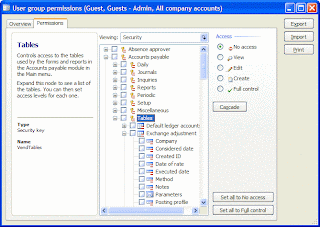
These temporary tables don't show up in the list when assigning rights to security groups.


Strangely enough, there are multiple temporary tables in the AOT with a security key attached to them. For example tables TmpDimTransExtract, TmpInventBalance, TmpInventAge, TmpPackMaterialFeeSum, ...

When a non administrator user has use of them, he or she will get an error like this:
(for example when you run a report based on a temporary table)

Unable to run report xyz due to access restriction in table ABC.
Object 'ReportRun' could not be created


I see 2 ways of solving this issue:

1) Remove the security key in the table properties
(Wether it makes sense to setup a security key to a temporary table in the first place is an interesting discussion.)

2) Change some code, either in the SysDictTable class or the SysSecurity class.
With this modification, you can assign rights for temporary tables to the user groups, just like you can with "normal" tables.


For the SysDictTable class, change the allowSecuritySetup method. Comment out the call to isTmp().


Alternative: For the SysSecurity class, change the expandSecurityKey method.

Make sure the AllowSecuritySetup method for SysDictTable isn't called for temporary tables.


This is a bit of a contradiction in Ax. According to the code, security is not expected to be setup for temporary tables. You cannot assign rights to user groups for them. But in the SYS layer of the AOT, there are a few temporary tables setup with security keys.


(If you've already openend the user group permissions form, you may have to restart the client after the above modifications, as the information in this form is cached.)

Wednesday, July 15, 2009

Dynamics Ax and security setup

Microsoft Dynamics Ax has a nice security setup. It hasn't changed much in the last few years, coming from Axapta version 3 to the current version Ax 2009. Basically it comes down to this: You put users together in user groups. Users can be members of multiple user groups. Then you assign security rights to these user groups. There is some more information, like domain setup and record level security, but they are optional.


I would like to focus this post on the rights given to user groups.


This information is collected in the table AccessRightsList.


Now although I am a fan of the security system in Ax, I also believe there is always room for improvement. So here is my case, based on two simple examples.

1) The form LedgerTable.

In this form, access to the control AccountBalance is controlled by the security key LedgerMisc. If you want your users to have access to the account balances, the setup for the security key LedgerMisc is required. But by giving access to this key, you also give access to all the child keys. That's now what you want. So you are forced to turn the parent key (LedgerMisc) on, and it's child keys off. Bad practice in my opinion.

2) Another example for the same scenario, the form Purchtotals.

This form displays the totals for a given purch order. It requires access to the table Common. To be able to use this form, the user must have access to the security key 'AdminTables'. This key has lots of child keys. Certainly you don't want your users to have access rights to all these tables from Admin. So you are forced to turn the parent key (AdminTables) on, and it's child keys off. Again, bad practice in my opinion.


My tips for Microsoft:

1) The inheritance principle is nice. Switch the parent key on, and you get all the child keys. But for a security setup, this is not recommended behaviour. But it would be even better not to assign security keys of the parent type to elements in forms.

2) You promote the use of 'roles' in the program heavily. A lot of marketing material uses these roles, these personas in the Contoso company (the CEO, the clerk, the order processor). Why not deliver a security setup for these various roles? Give the customer the data (security groups with permissions) for these various roles, so the customer doesn't have to start from scratch settting up his security?